-
E-mail
market@nutech17.com
-
Phone
18019425599
-
Address
Room 504-505, No. 26, Lane 99, Chunguang Road, Minhang District, Shanghai
Product Categories
- Digital current integrator
- ISOTOPIC gamma spectroscopy waste determination
- Silicon charged particle radiation detector
- GammaVision Report Generator
- ANGLE Advanced Gamma Spectroscopy Measurement Efficiency Calibration Software
- GammaVision Gamma Spectroscopy Analysis Software
- teaching experiment
- Online monitoring system
- DataMaster Spectral File Format Converter
- GammaVision's Global Value Productivity Suite
- Nuclide Navigation Pro, Interactive Nuclide Map, Reference Software
Shanghai Nayou Instrument Co., Ltd
DataMaster Spectral File Format Converter
NegotiableUpdate on 05/12
- Model
- Nature of the Manufacturer
- Producers
- Product Category
- Place of Origin
Overview
ORTECDataMaster provides a simple method for converting spectral data files between various formats
Product Details

ORTEC DataMaster provides a simple method for converting spectral data files between various formats. Typically, a major limitation in migrating from one spectrum system supplier to another is the backlog of "legacy" spectra that must be readable on the new system. This is especially true when the old system is no longer in use. Some manufacturers are even unwilling to disclose their file formats in an attempt to hinder the migration process. DataMaster eliminates this obstacle and simplifies the process.
-
data+
-
 DataMaster brochure
- DataMaster brochure (A4)
- DataMaster Manual
-
-
More information+
- Convert between spectral file formats
- Simple and easy-to-use Windows user interface
- Single spectrum conversion or multispectral conversion mode
- Interactive and command-line modes; Easy to integrate with other programs
ORTEC DataMaster provides a simple method for converting spectral data files between various formats. Typically, a major limitation in migrating from one spectrum system supplier to another is the backlog of "legacy" spectra that must be readable on the new system. This is especially true when the old system is no longer in use. Some manufacturers are even unwilling to disclose their file formats in an attempt to hinder the migration process. DataMaster eliminates this obstacle and simplifies the process.
Files can be easily converted using an intuitive and simple Windows user interface or through command-line mode, which can be used in conjunction with other programs in automatic processing.
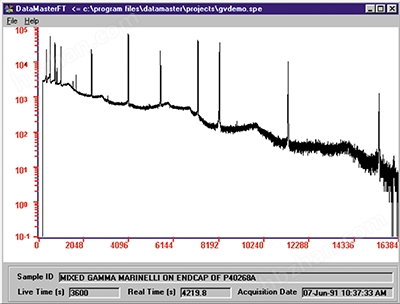
After loading the file into DataMaster during the interaction, the spectrum will be displayed graphically, making it easy for users to quickly confirm whether the file is correct.
Multiple files can be selected in interactive mode to automatically convert them in order.
Supported file types
Spectrum file format
input
output
Ortec adcam (*. CHN)
yes
yes
ORTEC INFORM (*.spc)
yes
yes
OXFORD PCA-2 (*.spm)
yes
No
OXFORD PCA-3 (*.spt)
yes
No
ASCII-1 (*.txt)
yes
yes
ASCII-2 (*.txt)
yes
yes
ROSSENDORF ASCII (*.spe)
yes
yes
IEC ASCII (*.iec)
yes
yes
IEEE ASCII (*.asc)
yes
yes
RMS ASCII (*.phd)
yes
No
LLNL ASCII (*.lll)
yes
No
SAMPO 90 (*.sam)
yes
yes
APTEC v6.3 (*.s0)
yes
No
CI S100 (*.mca)
yes
yes
About ACCUSPEC (*.dat)
yes
No
CI CAM (*.cnf)
yes1
yes1
The above table summarizes the input and output file formats supported by DataMaster. File format 16 (Canberra. CNF) is a proprietary file format that requires the system to have certain Canberra software components. If the appropriate Canberra software package (such as Genie 2000) is installed, these components are automatically included.command-line mode
Command line mode is used to convert a single spectrum specified on the MS-DOS command prompt. The syntax of the command line is:DataMaster - i Input file name - j Output file name
Where i is the format type number of the input file, and j is the format descriptor of the output file. Command line parameters are separated by spaces. The table displays the valid i and j values for input and output. Here is an example of a valid command line.
DataMaster -4 E:/OldData/pca3demo.spt -2 C:/Spectra/Pca3Demo.spt.spc
The command-line mode can be combined with the import function of ORTEC MAESTRO or γ Vision to seamlessly import "foreign" spectral files directly through these programs.
-
Order Information+
model
description
A49-B32
Applicable toWindows 2000/XPofA49-B32 DataMasterSpectral file format converter. (Including media, documentation, and standalone licenses.)